> ## Documentation Index
> Fetch the complete documentation index at: https://docs.ailunapro.com/llms.txt
> Use this file to discover all available pages before exploring further.
# Voice
> Voice Agents use TTS (Text to Speech), which generates audio that LLMs generate during the course of a conversation. This is the audio that the end user having the conversation listens to.
Voice AiLunaPro supports ElevenLabs, OpenAI, Google, Azure Speech, Deepgram, Cartesia, Smallest AI, MiniMax, Sarvam, Rime, Inworld, Camb.ai, xAI, LMNT, Speechify, and AiLunaPro TTS engines. There are some voices from the providers that we ship by default. You can refer to the providers API documentation to select a voice ID that's most relevant for your language requirement.
Voice providers receive the data needed to synthesize speech, such as generated text, selected voice, model settings, and request metadata. Review the provider's data processing, retention, model training, and regional hosting policies before using sensitive data.
For locally deployed or self-hosted TTS models, AiLunaPro also supports Speaches, an OpenAI API-compatible server for speech generation.
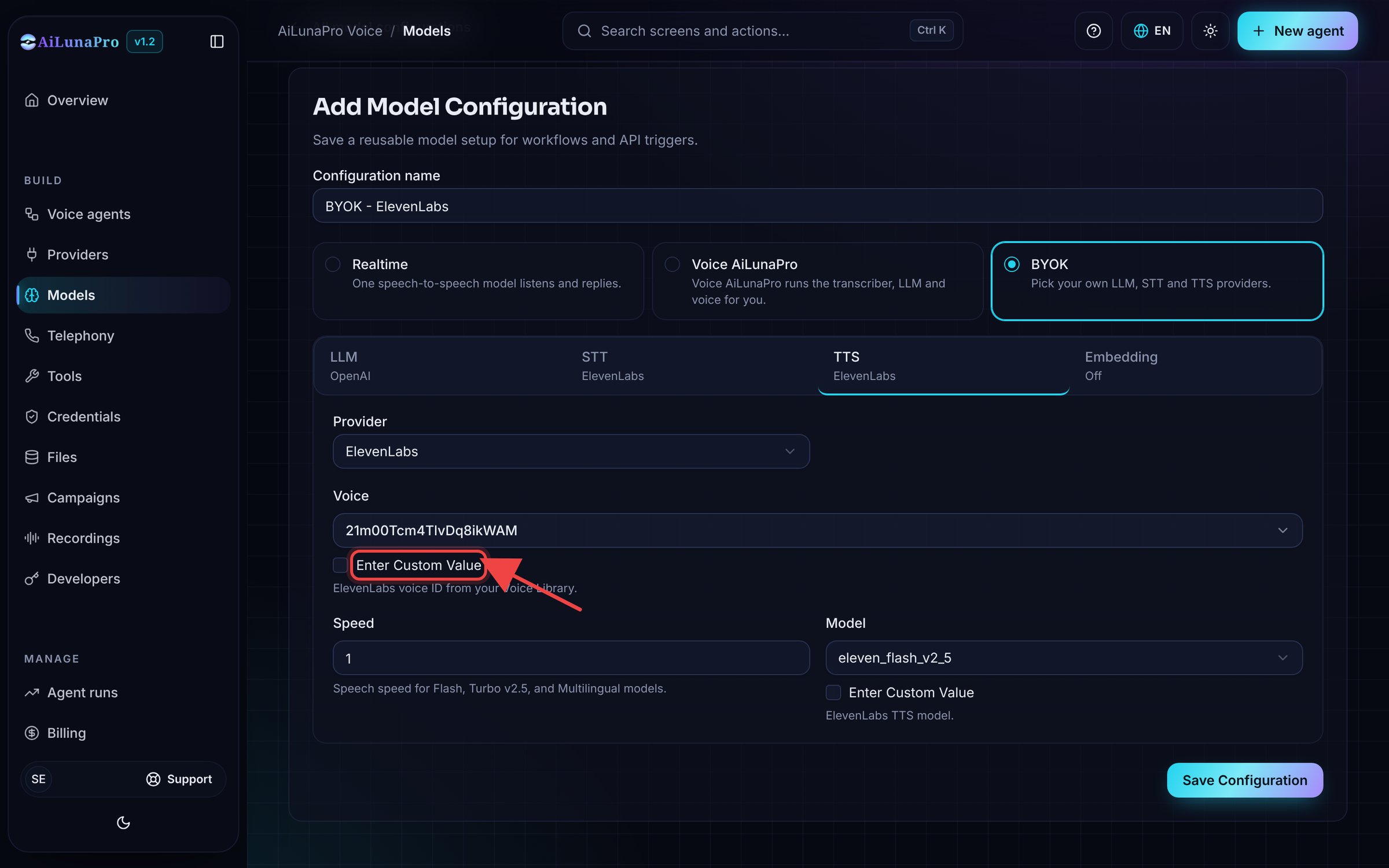
If you don't find your favourite voice, tick **Enter Custom Value** and paste the voice ID.
 This documentation is built and hosted on [Mintlify](https://mintlify.com), a developer documentation platform.